Free & Open · Windows · v2.10.1f

Real-time BPM detection.
Live-ready OSC output.

BPM2OSC listens to any audio source and streams tempo data over OSC to lighting consoles, VJ software, and show-control systems — with zero latency overhead and no cloud dependency.

126.0 BPM

Windows 10/11· Free forever· No account needed

Everything you need on stage

Built for live events, DJ sets, and show-control environments where rock-solid tempo data needs to reach multiple systems simultaneously.

🎯

Custom DSP engine

No external beat-tracking libraries. The pipeline — high-pass filter, Superflux ODF, multi-scale ACF, multipath EMA hypothesis, Kalman filter — is implemented in pure Python/NumPy/SciPy for full transparency and zero black-box surprises.

📡

Multi-target OSC

Send BPM and beat triggers to any number of destinations simultaneously over UDP or TCP. Each target has its own OSC paths, protocol, and enable toggle.

🔁

System loopback (Windows)

Capture whatever is playing through your speakers or headphones — no physical cable needed. Perfect for DJ software, media players, or any desktop audio source.

🎛️

Genre presets

7 built-in presets pre-tuned for Rock, House, Hip-Hop, Techno, Latin, and more. In Auto mode the octave-correction gates self-narrow around the first stable tempo, so the engine adapts to the genre automatically without manual selection.

🔒

Auto-lock

Freeze the BPM automatically when detection confidence drops — e.g. during breakdowns or DJ transitions. The display and OSC hold the last good value without any manual intervention.

🥁

TAP tempo & ÷2 / ×2

Override the engine instantly by tapping or halving/doubling the detected value. Configurable timeouts let overrides expire automatically so you never forget to undo one.

📊

AlgoMonitor

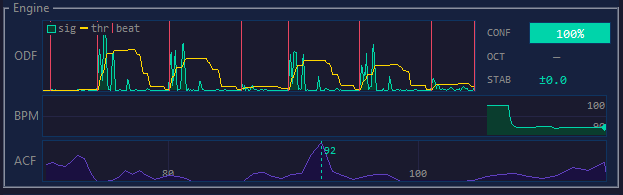
Live diagnostic panel showing the ODF waveform, adaptive threshold, onset ticks, CONFIDENCE bar, OCTAVE badge, STABILITY readout (±0.01 BPM), PRECISION state (NORM / SYNC / HIGH), BPM history graph, and full ACF score curve — all at 50 fps.

⏱️

Beat phase sync

A complex DFT at the detected tempo frequency gives the absolute time of the next beat, used to phase-lock the metronome automatically. No manual RESYNC required between songs.

🎚️

Multichannel VU meter

Per-channel RMS bars with peak hold and decay. Green / yellow / red zones match the classic −18 dB / −6 dB broadcast thresholds. Automatically expands for stereo and multi-channel devices.

🌐

Web UI & REST API

Built-in web server (port 5000) serves a real-time remote control page from any browser on your LAN — no install required. All controls available as REST endpoints for Bitfocus Companion via Generic HTTP, or use the dedicated native module for full actions, feedbacks, variables, and Stream Deck presets.

Nine steps from audio to BPM

The detection engine runs on a dedicated audio thread and never blocks the UI. Every step is tunable and visible in the AlgoMonitor panel.

01

High-pass filter + Superflux ODF

A 2nd-order Butterworth high-pass at 20 Hz removes DC and sub-bass rumble before onset detection. The Superflux ODF then measures half-wave-rectified spectral flux against a max-pooled previous frame, weighted across 5 sub-bands. Suppresses vibrato and pitch-modulation false positives.

02

Multi-scale ACF

Two parallel autocorrelation windows — 12 s (long, stable) and 4 s (short, reactive) — with harmonic scoring S(L) = Σ acf[k·L]/k for k = 1…16. The short window drives fast-adapt: if its high-confidence BPM diverges >8% from the Kalman estimate, the filter snaps immediately to the new tempo.

03

Multipath hypothesis

Four competing hypotheses — BASE, ÷2, ×2, 4:3 — each accumulate EMA votes across frames (α=0.70). A hypothesis commits only after reaching 54% share (~7 frames ≈ 2.5 s of consistent evidence), preventing single-frame octave flips during breakdowns and genre transitions.

04

Confidence gates

Two gates protect the Kalman: Gate 2 discards flat-spectrum frames (score < 2.5× noise floor). Gate 3 — the breakdown hold — raises the bar to 0.60 once the Kalman is initialised, blocking hi-hat and pad periodicities from drifting the estimate during breakdowns.

05

Tempo inertia + Kalman

Readings that jump >15% from the recent median are capped at the median unless a deliberate hypothesis correction is active. A scalar Kalman filter smooths the output; after sustained high-confidence frames it enters precision mode (tighter Q/R). DFT Newton iterations refine each ACF estimate to sub-0.01 BPM; on stable signals, beat-grid IRLS regression over accumulated beat timestamps blends in for added long-term accuracy.

06

Stuck-state recovery

If the long-window ACF is confidently at a BPM that disagrees with the Kalman by >20% for ~2.8 s (8 consecutive frames), the engine is locked to a false tempo — typically from a prior fast-adapt snap. The Kalman is force-reset to the ACF reading, and fast-adapt is inhibited for ~7 s to let the long window re-stabilise before a new snap is allowed.

07

Adaptive prior

After 15 consecutive high-confidence frames (≥ 0.75) the Gaussian prior self-anchors to the current Kalman value, keeping the engine centered on the active tempo through long sets without manual intervention. In Auto mode the octave-correction gates also narrow dynamically around the stabilised BPM.

08

Beat phase

Complex DFT at the tempo frequency gives the instantaneous beat phase → absolute wall-clock time of the next beat. The UI metronome phase-locks to this without any manual RESYNC (Müller 2015 §6.2).

09

OSC output

BPM, beat trigger, bar position (1–4), and confidence (0.0–1.0) are broadcast over UDP or TCP to all configured targets. Paths are fully configurable per target. BPM is sent only on change plus a 10 s keepalive to keep network traffic minimal.

Clean, simple OSC messages

BPM2OSC sends five message types. Paths, port, and protocol are fully configurable per target.

/bpm float Current BPM value at 2 decimal places (e.g. 126.00). Sent on every change ≥ 0.05 BPM and every 10 s as a keepalive.
/beat int 1 Fires on every detected beat tick. Use it to trigger cues, flash lights, or sync effects.
/beat/bar int 1–4 Bar position: 1 on the downbeat, 2, 3, 4 on subsequent beats. Resets to 1 after RESYNC. Path is configurable per target.
/bpm2osc/confidence float 0–1 Detection confidence on every ACF frame. 1.0 = dominant, clear beat; values below 0.5 indicate breakdowns or weak signal. Useful for automating downstream responses.
/resync int 1 Fires when the operator presses RESYNC. Signals a manual phase correction to downstream systems.
Normalize BPM — enable per-target to remap the BPM float to a 0.0–1.0 range. Required for Resolume Arena: path /composition/tempocontroller/tempo, port 7000, normalize on (min 20 / max 500). Resync maps to /composition/tempocontroller/resync.
TCP auto-reconnect — TCP targets that fail to connect are retried automatically every 15 seconds. The target dot turns red in the UI during the outage and goes green once the connection is restored.

Tuned for your genre

Each preset sets the BPM search range, the Gaussian prior, and the octave-correction gates. Select one with a single click — or fine-tune the numeric values manually.

Auto

60 – 200 BPM
Works well for most genres. Start here and switch if needed.

Rock / Live

65 – 155 BPM
Rock, pop, live sets. Fixes ballads incorrectly doubled to 130+.

Ballad / Slow

50 – 105 BPM
Slow songs, folk, cinematic. Excludes high-BPM false peaks entirely.

Dance / House

115 – 145 BPM
House, nu-disco, French touch. Keeps ÷2 gate low for 2-beat grooves.

Hip-Hop / R&B

70 – 115 BPM
Hip-hop, trap, R&B. Handles half-tempo groove patterns.

Techno / D&B

130 – 185 BPM
Techno, drum & bass, hardstyle. High prior keeps engine anchored.

Latin

85 – 125 BPM
Salsa, reggaeton, cumbia. 4:3 clave correction is key here.
Dead-zone example — at 72 BPM ("Knockin' on Heaven's Door"), the default engine can lock to 135 BPM because 135 falls between the ×2 gate (155) and ÷2 gate (90) — so neither correction fires. Switch to Rock / Live and the ×2 gate drops to 128, catching 135 and halving it back to ~67 BPM.

See it in action

A closer look at the main window, live diagnostics, and settings.
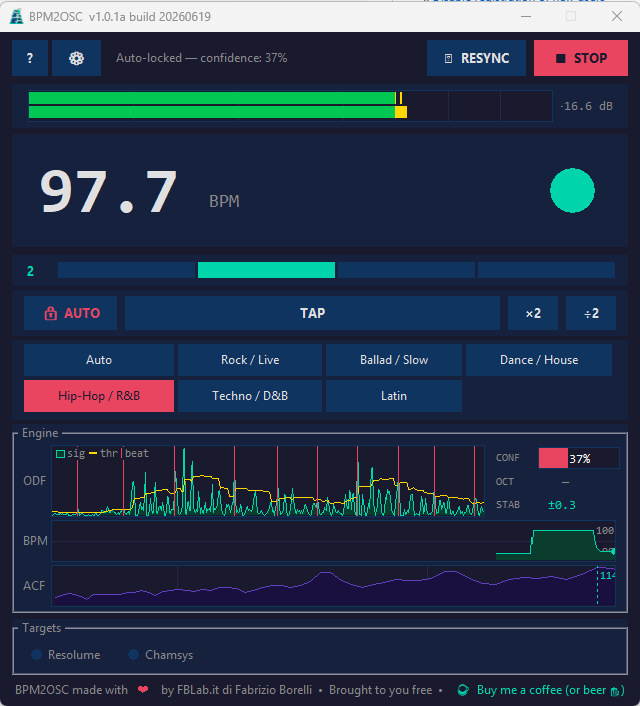
BPM2OSC main window showing 124.32 BPM, VU meter, beat-wheel, bar indicator, preset bar, and the Engine (AlgoMonitor) panel

Main window

AlgoMonitor Engine panel with ODF waveform, BPM history, ACF score curve and 100% confidence bar

AlgoMonitor — Engine diagnostics

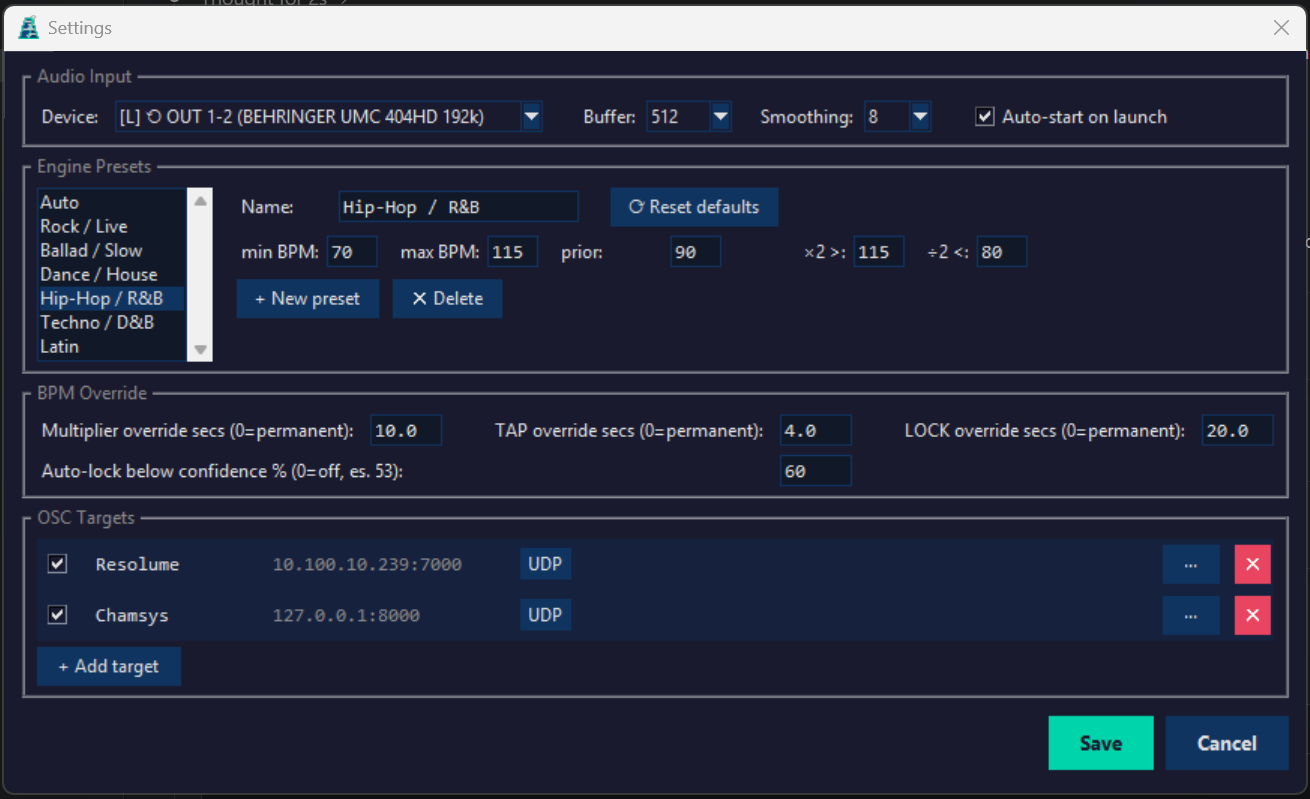
BPM2OSC Settings window showing Audio Input, Engine Presets, BPM Override and OSC Targets sections

Settings

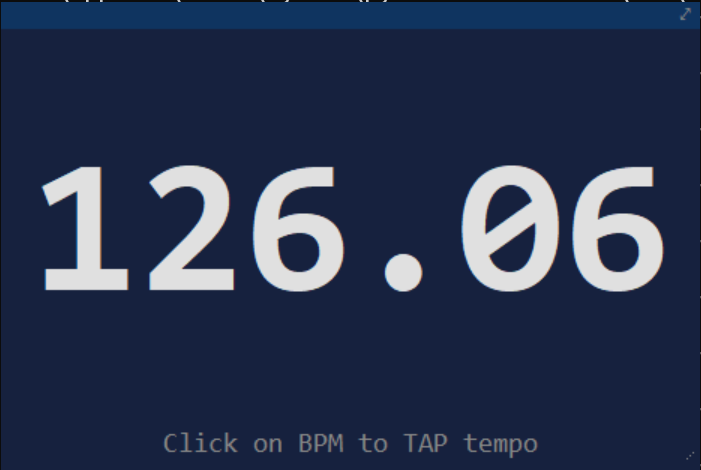
BPM2OSC mini window showing 126.06 BPM and the 'Click on BPM to TAP tempo' hint

Mini window

What's New

v2.10.1f 8 July 2026 — feature release
  • Mini window — small, freely resizable BPM-only readout (⛶ button): tap tempo from the BPM digits, draggable borderless mode, optional always-on-top.
  • Hover tooltips on top-bar buttons, BPM controls, beat indicator and AlgoMonitor readouts, reviewed for clarity and accuracy.
  • Show/hide UI panels — independently hide the VU meter, beat indicator, AlgoMonitor, metronome bar, click icon, presets or Targets panel; the window resizes to fit.
  • Click icon redesigned as a compact metronome-style icon; removed the bottom donate line (still in the About dialog).
  • Bug fixes — ODF graph no longer leaves a blank gap on wide panels; "hide metronome" toggle no longer affects the click icon (now separate toggles); RESYNC no longer causes the click to double-fire; top-bar icon sizing made consistent.
v2.8.1f 6 July 2026 — feature release
  • Audio click — new CLICK button plays an audible, phase-locked click on every beat, with downbeat accent, independent output device/API/volume settings, and loopback feedback protection. Latency is self-calibrated per device for accurate sync.
  • Settings — API selector to de-duplicate audio devices listed once per host API (MME/DirectSound/WASAPI/WDM-KS); device channel count now shown.
  • Bug fixes — sample-clock drift correction for both standard input and Loopback capture (was reading a slightly wrong BPM); fixed WASAPI "Unanticipated host error" via automatic host-API retry; fixed VU meter always showing 1 channel; fixed app freeze and occasional double/triple click firing on click-enable; fixed status text overlapping the CLICK button and the window resizing itself unexpectedly.
v2.7.8 30 June 2026 — feature release
  • Tap Tempo prior override — TAP now permanently overrides the ACF prior BPM until the preset changes or it's manually cleared, shown in the Engine monitor as PRIOR BPM (Preset/Adaptive/Override); the guide window around the tapped BPM is now configurable in Settings.
  • Bug fixes — ACF lag search no longer truncates the minimum reachable BPM at preset boundaries; reduced DFT refinement overshoot chasing false harmonic peaks; fixed overlapping Settings fields and overdrawn ACF grid labels.
v2.6.5 30 June 2026 — bugfix release
  • Bug fixes — metronome no longer chases live phase estimates while the BPM is locked; fixed octave-correction instability that caused the BPM to oscillate between octaves on tracks with a strong eighth-note pulse.
v2.6.3 28 June 2026 — feature release
  • Precision engine upgrade — DFT frequency refinement (±0.1 → ±0.002 BPM), beat-grid regression blended with the Kalman estimate, adaptive Kalman precision mode after sustained high confidence, and output resolution raised to 0.01 BPM.
  • AlgoMonitor — new PRECISION row (SYNC/NORM/HIGH); STABILITY now shown to 0.01 BPM.
v2.5.0 27 June 2026 — feature release
  • Web UI & Bitfocus Companion integration — built-in web server with a browser remote-control page (BPM, beat wheel, VU meter, engine monitor, presets) and a REST API Companion can drive via its Generic HTTP module.
  • Higher BPM precision & stability — harmonic sum extended to k=16, confidence via median noise floor, adaptive Kalman noise scaling, and a dead-band filter for a stable displayed BPM.
  • No-beat hold option — keep the last BPM instead of stopping when confidence drops.
  • Bug fixes — octave correction now actually commits (gate-driven multipath hypothesis); metronome/OSC properly stop and restart on no-beat with auto-lock hysteresis and a large-jump guard; fewer false fast-adapt snaps during track changes; preset changes reset the Kalman filter; fixed beat-wheel glitch and hold-BPM display bug.
v2.0.1a 25 June 2026 — bugfix release
  • Breakdown hold (Gate 3) — low-confidence frames are discarded once the Kalman filter is initialised, preventing hi-hat/pad periodicities from drifting the BPM during breakdowns or DJ transitions.
  • Tempo inertia hardening and auto-preset smart gate narrowing reduce the need for manual preset selection and wrong large BPM jumps.
  • Per-target OSC Confidence/Bar-beat paths, each independently configurable and opt-in.
v2.0.0 25 June 2026 — major release
  • scipy.fft + high-pass filter for cleaner onset detection; multi-scale ACF (4 s / 12 s windows) with fast-adapt track-change detection.
  • Multipath EMA hypothesis system for octave correction (BASE, ÷2, ×2, 4:3), eliminating single-frame octave flips.
  • Adaptive prior that self-anchors after sustained high confidence; TAP injects prior for instant convergence.
  • New OSC outputs/bpm2osc/confidence and /beat/bar, fully configurable per target.

Download BPM2OSC

Free Windows installer. No account, no subscription, no telemetry.

⬇ Download for Windows
v2.10.1f· Windows 10 / 11· ~45 MB
Windows SmartScreen notice — BPM2OSC is free software distributed without a commercial code-signing certificate. Windows may show a "Windows protected your PC" warning when you run the installer. Click More infoRun anyway to proceed. The software contains no telemetry, no ads, and no malware.

System requirements

  • Windows 10 or 11 (64-bit)
  • Any audio input device (microphone, USB interface, line-in)
  • Loopback capture requires an active audio output device
  • Network access for OSC output (LAN or localhost)

Questions or feedback?

Found a bug, have a feature request, or want to integrate BPM2OSC with your console?

✉ Contact info@fblab.it Read the full manual →
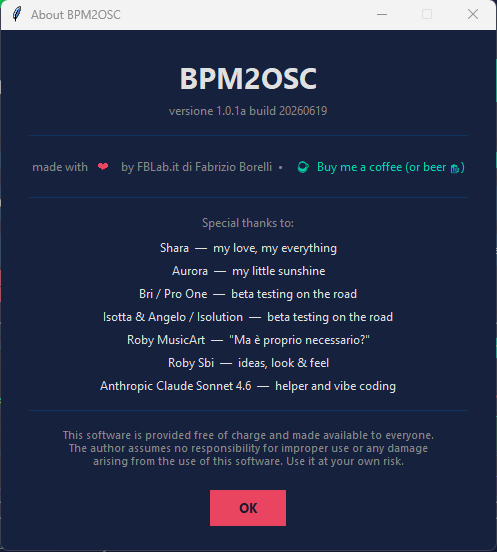
About BPM2OSC — credits dialog

Made with love

BPM2OSC is free software, built by Fabrizio Borelli / FBLab.it and given to the live-events community at no cost.

Special thanks to Shara, Aurora, Bri / Pro One, Isotta & Angelo / Isolution, Roby MusicArt, Roby Sbi, and Anthropic Claude Sonnet 4.6 for help, beta testing, and vibe coding.

☕ Buy me a coffee (or beer)